Clean sub.
Filthy wall.
Amp crunch, compaction and width for rage, hyperpop and electro drops.
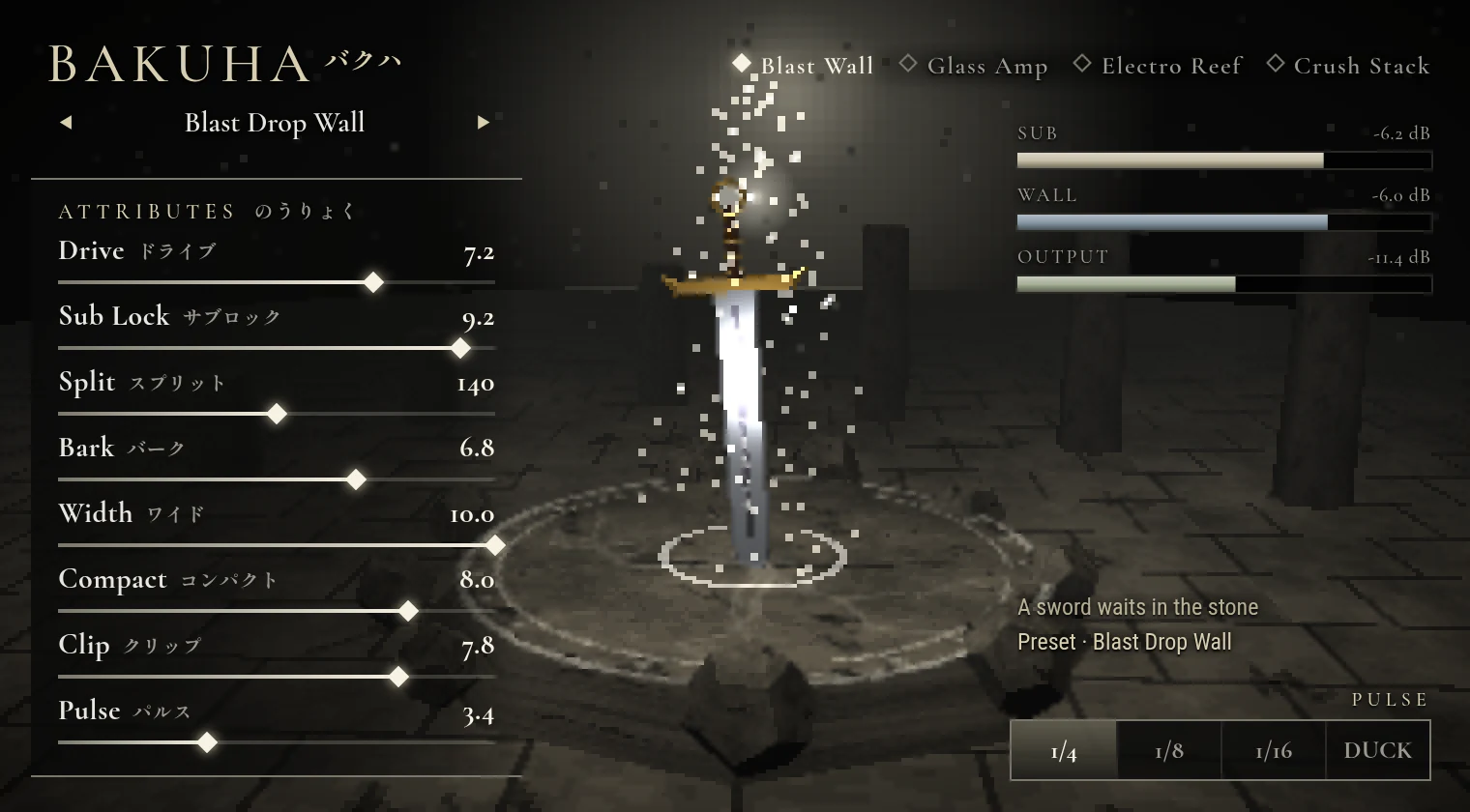
Bakuha by Afterimage Audio is an amp-distortion and wall-compactor VST3 effect for Windows. Put it on your chords, your 808 or the whole drop. Bakuha keeps everything under the split clean and mono, drives everything above it through a guitar amp, spreads it wide, then squashes it into one loud wall. Pump and gate it in time without any sidechain routing.
Under a minute. The whole workflow.
The audio is Bakuha itself, rendered on hyperpop and EDM loops at 150 BPM: a full loop, then a bass line, a lead and chords on their own, then the full loop again. The picture shows the Bakuha interface making the same preset, voicing and control moves you hear.
- 0:00 Your loop: a full hyperpop loop, dry
- 0:06 Blast Drop Wall: one compacted wall
- 0:12 Sub Lock: bass line, clean mono low end
- 0:19 Amp voicings: lead, four amps, one bar each
- 0:25 Stereo wall: chords, wide top, centred sub
- 0:32 Pulse and gate: pump, then 1/16 chop
- 0:38 All together: Electro Reef Bite
Made for heavy drops.
Bakuha works on any audio, but it is built for the part of the beat that has to hit hardest: chord stacks, saw leads and 808s, alone or all on one bus.
A sub that stays clean
The low end skips the amp and stays mono, so your 808 keeps its weight while everything above it gets distorted and wide.
Guitar-amp crunch on synths
Four amp voicings turn plain saws and chords into a crunchy, barking wall without the fizz of a cheap distortion.
Wide, loud, compacted
A stereo doubler, a three-band compactor and a soft clipper glue every part into one dense, ultra-wide block.
Pump and gate in time
Quarter and eighth pumps, a 1/16 gate and a transient ducker, all locked to your DAW tempo, with no sidechain to set up.
A heavy drop in 30 seconds
- Insert it. Put Bakuha on your chord or lead track, your 808, or a bus with the whole drop on it.
- Pick a preset. Start with Blast Drop Wall for a full drop or Electro Reef Bite for basses, then try the other three amp voicings.
- Set the split. Turn up Sub Lock and move Split Hz until the 808 sounds clean and the crunch sits just above it.
- Push and pump. Raise Compactor and Soft Clip for loudness and Stereo Wall for width, then add a 1/4 pump or the 1/16 gate.
Every control, in plain English.
Bakuha splits your sound in two. The low end stays clean and mono. Everything above it runs through an amp and gets widened, then the whole thing is compacted and soft-clipped back into one loud signal.
- Split Hz
- Where the low end ends. Everything under it skips the amp entirely, so the sub and 808 stay round and phase-clean. 110 to 130 Hz suits most 808s.
- Sub Lock
- Pulls everything under the split into mono and evens out its level, so the sub sits still while the wall above it moves.
- Amp Drive
- How hard the upper band hits the amp and diode clipper. Low is warm grit; high is a full guitar-amp crunch.
- Amp voicings
- Blast Wall for huge chord-and-bass drops, Glass Amp for sharp plucks with a roaring sustain, Electro Reef for biting electro saw basses, Crush Stack for bit-crushed intros and hyperpop textures.
- Clarity, Amp Bark and Cab Contour
- Scoop the boxy low mids, push upper-mid presence and tame digital fizz so the crunch never turns to mud.
- Stereo Wall
- Spreads the amp harmonics with a micro-doubler and side saturation. The sub never widens, so it stays mono-safe on club systems and phones.
- Compactor
- Lifts quiet tails and clamps loud peaks across low, mid and high bands at once, turning separate parts into one wall.
- Soft Clip and Output
- Morphs from a smooth soft clipper to a hot brickwall ceiling, with output from −18 to +6 dB.
- Pulse and ducking
- 1/4 and 1/8 pump, a 1/16 gate and a transient duck, locked to your DAW tempo, with Pulse Depth to set how much you hear.
- Mix, presets and randomize
- Blend in the dry signal for parallel crunch, start from 10 factory presets, or roll a new setting within musical ranges.
Five stages. One window.
A clean-sub crossover, a four-voicing amp, a stereo wall, a three-band compactor and a soft-clip brickwall, with tempo-synced pulse on top.
- Windows 10/11 x64 VST3
- Clean, mono sub under a crunchy, wide top
- 4 amp voicings and 4 pulse modes
- 10 factory presets for drops, verses and basses
- Two activations, up to 30 days offline
$24.99 USD, one-time purchase. Secure checkout powered by Whop.
From zip to sound.
- Download: open My Bakuha with the email you used at checkout. Your private VST3 ZIP and license key are there.
- Install: close your DAW, extract the ZIP and copy the Bakuha.vst3 folder to C:\Program Files\Common Files\VST3.
- Activate: reopen your DAW, rescan VST3 plugins, load Bakuha on a track and enter your license key while online.
The fine print.
Will it wreck my low end?
No. Everything under Split Hz skips the amp and the stereo widening, and Sub Lock keeps it mono and steady.
What should I put it on?
Supersaw chords, saw leads, 808s and reese basses, or a bus with the whole drop on it.
What hosts does Bakuha support?
Any Windows x64 DAW that supports VST3. FL Studio and Ableton Live are the main test hosts.
Do I need a sidechain for the pump?
No. The pulse modes lock to your DAW tempo on their own.
Can I use it offline?
Yes, for up to 30 days after online activation.
How many computers can I activate?
Two, and you can release one from My Bakuha.